
Best Tools and Apps for Substack Writers
10 powerful tools I can't live without

Hey Substack,
Hope you’ve had a top week.
In this post, I share the tools and apps I couldn’t live without as a writer and online business owner.
The list contains a few of ‘the usual suspects’, plus a few hidden gems which you have probably never heard of. I hope it helps you find a new super-tool to make your working life a little easier.
The best thing about this list: most of these apps are free!
1. ShareX
Share X is a screen-capture app that is fast to use, and makes mark-ups, arrows and borders a breeze.
Use keyboard shortcuts to take a screenshot, then add pixelation, drawings, stickers, shapes, text and borders in seconds, then save it straight to your clipboard, or file it for later.
You can even save your screencap as an animated GIF.
My favorite feature: “smart erase”
Cost: free
Get it here: https://getsharex.com/
2. Canva
Why does everyone use Canva? Because it’s good and it’s free. If you want text in images, or a cohesive brand look, none of the AI tools can beat it (yet).
My favorite feature: being able to see all my past designs in one place.
Cost: free (paid plans also available)
Get started here: https://www.canva.com/
3. Paint.net
Paint.net is a free tool for doing design work you can’t do in Canva, like creating images with multiple layers, then editing just one layer at a time. Its magic wand eraser removes backgrounds for free (that’s a paid feature in Canva), and you can choose the sensitivity of the selection tool.
I use it for photo touchups, logos, changing the hue and saturation of images and resizing images.
My favorite feature: “lasso select”
Cost: free
Get it here: https://www.getpaint.net/
4. Read Out Loud
This Chrome extension does exactly what it says on the box: it reads the text on your screen out loud to you. So I can catch up on posts by my favourite writers while I pack my dishwasher. What’s not to love?
My favorite feature: adjustable speeds and choice of accents.
Cost: free
Get it from the Chrome extension store
5. Google Search Console
If your Substack answers questions, then search engines can be a good source of new subscribers. Search Console shows you which posts are getting found and what people are searching for to find them.
Cost: free
Get started here: https://search.google.com/search-console/
6. Substack Recommendations
Substack’s Recommendations feature is one of the best growth tools available, and it’s already built right into your Substack publication. Use it to support writers you know and admire. One day they will return the favour.
Cost: free
Find it in the ‘Creator Tools’ section of your publication dashboard’s left side menu.
7. Grammarly
I resisted using Grammarly for way too long. All those extra hyphen suggestions and patronising style recommendations. Plus, who puts a comma before the word ‘And’? Grrrr!!
These days, though, I can’t do without Grammarly. Its red underlines serve like a silent proofreader as I race to finish my food safety newsletter before the deadline each week; showing me typos and other easy-to-miss mistakes.
Cost: free
Grammarly comes as a Chrome extension or a downloadable app. Find out more here:
8. MS Word
Yes, this is super old-school, but Microsoft Word is my secret newsletter organisation weapon. Word’s secret weapon is headings. Word’s heading functions allow me to easily navigate post ideas and re-order future post sections by dragging and dropping whole sections of text.
9. Substack Pro Studio
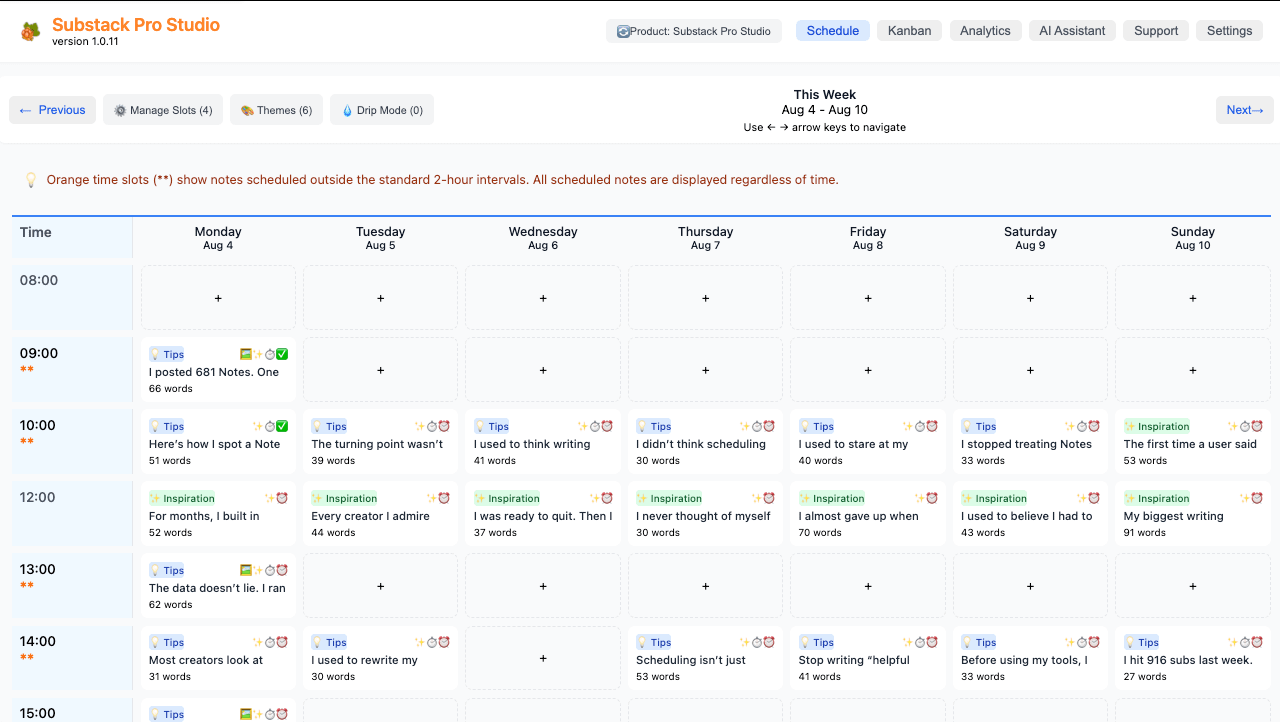
Substack Pro Studio is Notes scheduling made easy. See all your scheduled notes on a single screen, drag and drop notes with different themes, handle drafts and images all in one place.
Favorite feature: Set and forget time slots - no more manual scheduling.
Get it here: Finn Tropy Substack Pro Studio (paid1)
10. Calendly
Time zones are a headache when you’re collaborating across borders.
With Calendly, you can set your availability, share the link and Calendly automatically converts your availability into the viewer’s timezone, so they can book an appointment without the painful back and forth.
Cost: free (paid plans also available)
Get started here: https://calendly.com/
You don't need to spend a fortune to run a professional Substack, most of these tools are completely free to use forever.
Which is your favourite? What have I missed? Let me know in the comments.
I love Finn’s tool so much that he gives me a commission when I spread the word about it.
Great article.
You could add stackreach.app
I built a free tool to generate social media cards from notes
Thank you Karen , I always learn something new from you 💗